
Dynamic Callout
Start more conversations and win over hesitating visitors — with a greeting written for the exact product they are looking at.
What it does
Normally your chat bubble shows the same greeting on every page. With Dynamic Callout on, the agent reads the product the visitor is viewing and writes a short line about that product — something like "Curious about this Oslo sofa?"
The whole point is to start more conversations and convert hesitating visitors. Most shoppers who are unsure about a product never ask; they just leave. The greeting is written to surface the exact question or objection holding them back, so the doubt turns into a conversation instead of an exit.
It is passive. The greeting sits on the closed bubble and the visitor still chooses to click.
Turn it on
Go to Chatbot Setup → Dynamic Callout and tick "Enable AI-personalised greeting on product pages".
It is off by default, so nothing changes for your storefront until you switch it on.
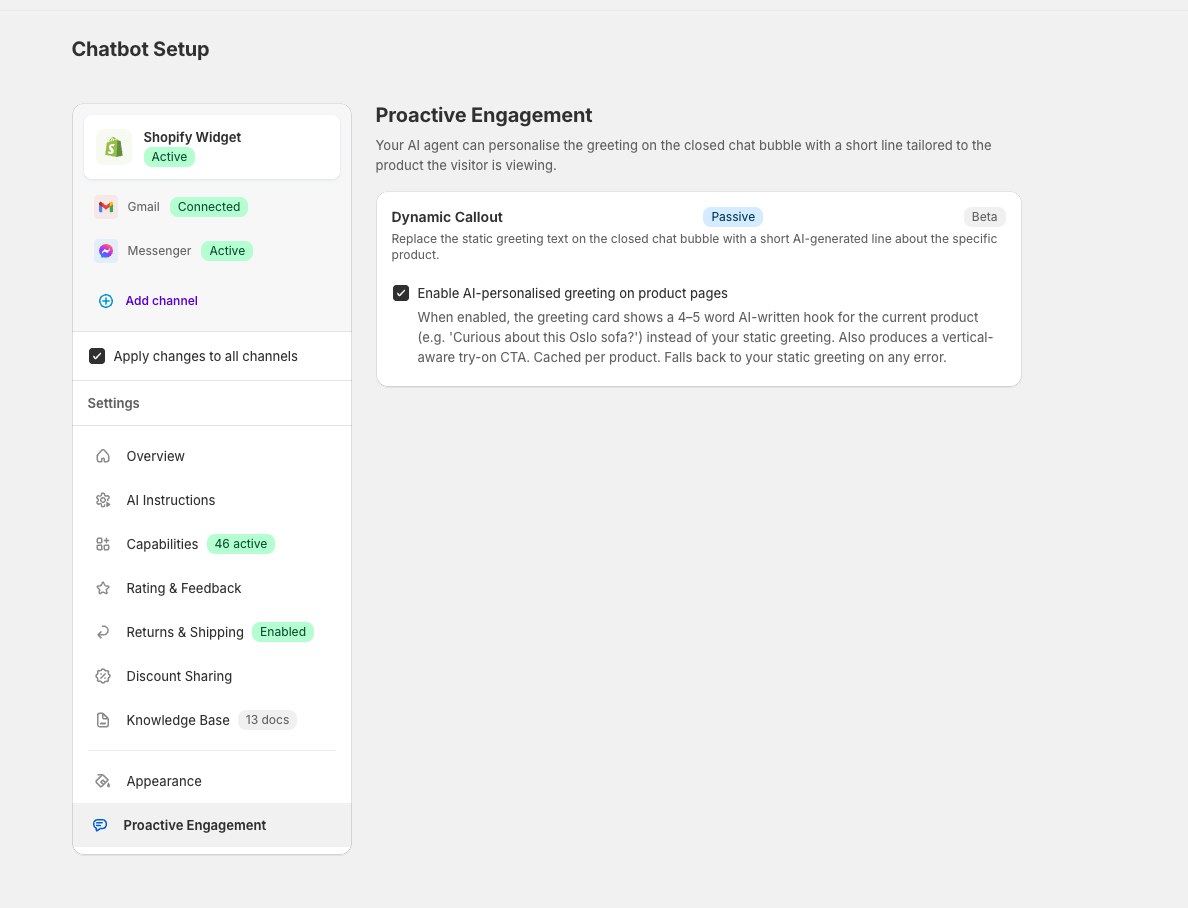
Dynamic Callout is the last item in the Settings list, under Appearance.
What the agent writes
On each product page the agent produces a small set of copy, not just one line:
- The greeting — 4–5 words inviting questions about this specific product
- A short call to action under it, so it is obvious the bubble is clickable
- A try-on button label, when virtual try-on applies
- Two example questions a shopper might ask about the product
The try-on wording adapts to what you sell. Supportify detects the product's vertical — apparel, interior, cosmetics, or generic — and matches the phrasing to it.
Tone comes from your agent
The greeting inherits the same voice as the rest of your chat. If your brand reads casual, the hook is casual; if formal, formal.
There is nothing to configure here — adjust the System Prompt in AI Instructions and the greetings follow.
Languages
Greetings are written in the shopper's language, using the same locale your storefront reports.
On multi-market stores we generate AI copy for your main markets and serve translated standard copy for the long tail of rarely-used locales — so a visitor never sees an untranslated greeting, whichever market they arrive from.
What it costs
The greeting itself is free. Writing it happens on our cost, and no chat session exists just because a greeting was shown.
Billing only starts if the visitor clicks the bubble and sends a message — at that point it is an ordinary conversation at the standard $0.60 session price, exactly like any other. See Billing & Usage.
Turn it off
Untick the same box. The bubble goes straight back to your static greeting — no redeploy, no theme edit.
If something goes wrong
The greeting is designed to fail quietly. If the AI call errors or times out, the bubble shows your normal static greeting instead — the visitor never sees a blank bubble or an error.
Greetings are also cached per product and only rewritten when the product's own text changes, so repeat visitors get an instant bubble rather than waiting on a fresh generation.
Where the rest of the styling lives
Dynamic Callout only controls the words. The bubble's colours, position, header text, your static fallback greeting, and the delay before the greeting appears are all still set in the Shopify theme editor — see the Appearance tab in Chatbot Setup for the link.